


MagnolIA Nexus: the AI agent app connected to your own server.
MagnolIA's app for macOS and Windows, with Magni built in. Agents that work as a team, terminals, projects, notes and meetings in a single environment, with your MagnolIA account and connected to your MagnolIA Server, inside your network. Third-party models such as Claude are added only if your organisation chooses to.
MagnolIA Nexus is MagnolIA's desktop app for macOS and Windows: AI agents that work as a team with per-project memory, terminals, notes, meetings and the personal assistant Magni. It connects to your organisation's MagnolIA Server, so the work you do with AI stays inside your network.
- Systems
- MagnolIA Nexus runs on macOS 13 or later and on Windows. Magni also has a mobile app for iPhone and Android.
- Meetings
- Meet, Zoom or Teams meetings are transcribed with the speech model on your MagnolIA Server: the audio is not sent to an external service.
- Sync
- Settings, connections and Magni's memory sync between devices with end-to-end encryption.
A working environment, not another tool
Nexus is the layer your teams see and use. It organises AI work by project, keeps a record of every run and applies the same access rules as the rest of the platform.
Inference on your network
Models run on your MagnolIA Server. In the office, Nexus connects straight to the machine; outside, through the organisation's encrypted access.
Control by design
Reading within the authorised scope is automatic. Writing, running, paying or reaching the network follows each organisation's policy: ask for approval or act within set limits. The app enforces it, not the model.
One account, every device
Settings, connections, the conversation with Magni and its memory sync across Mac, Windows and mobile, end-to-end encrypted. Credentials stay in the system keychain.
How a team works with Nexus
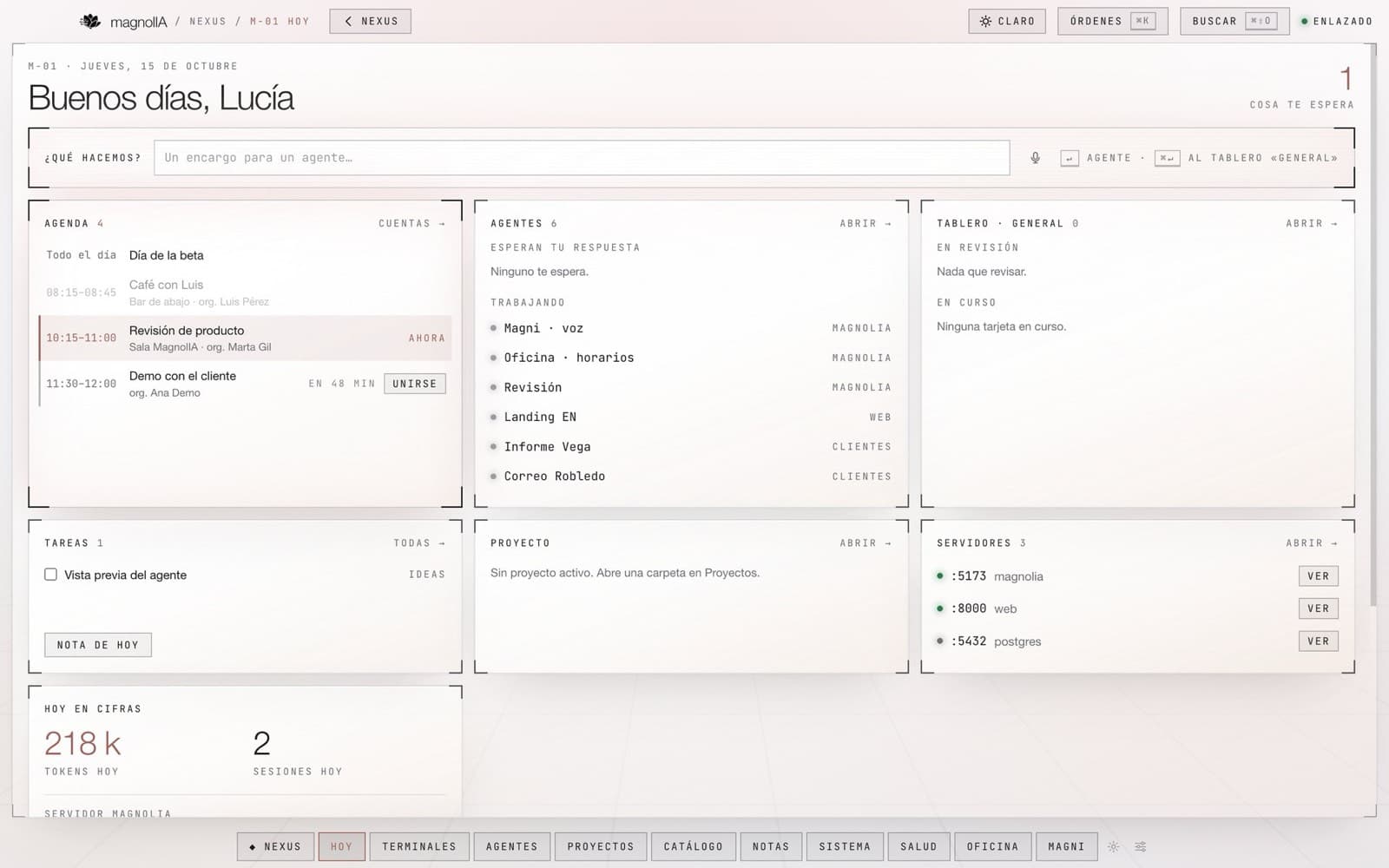
Today
The day at a glance: calendar, tasks in progress, agents awaiting approval, open to-dos and server status.
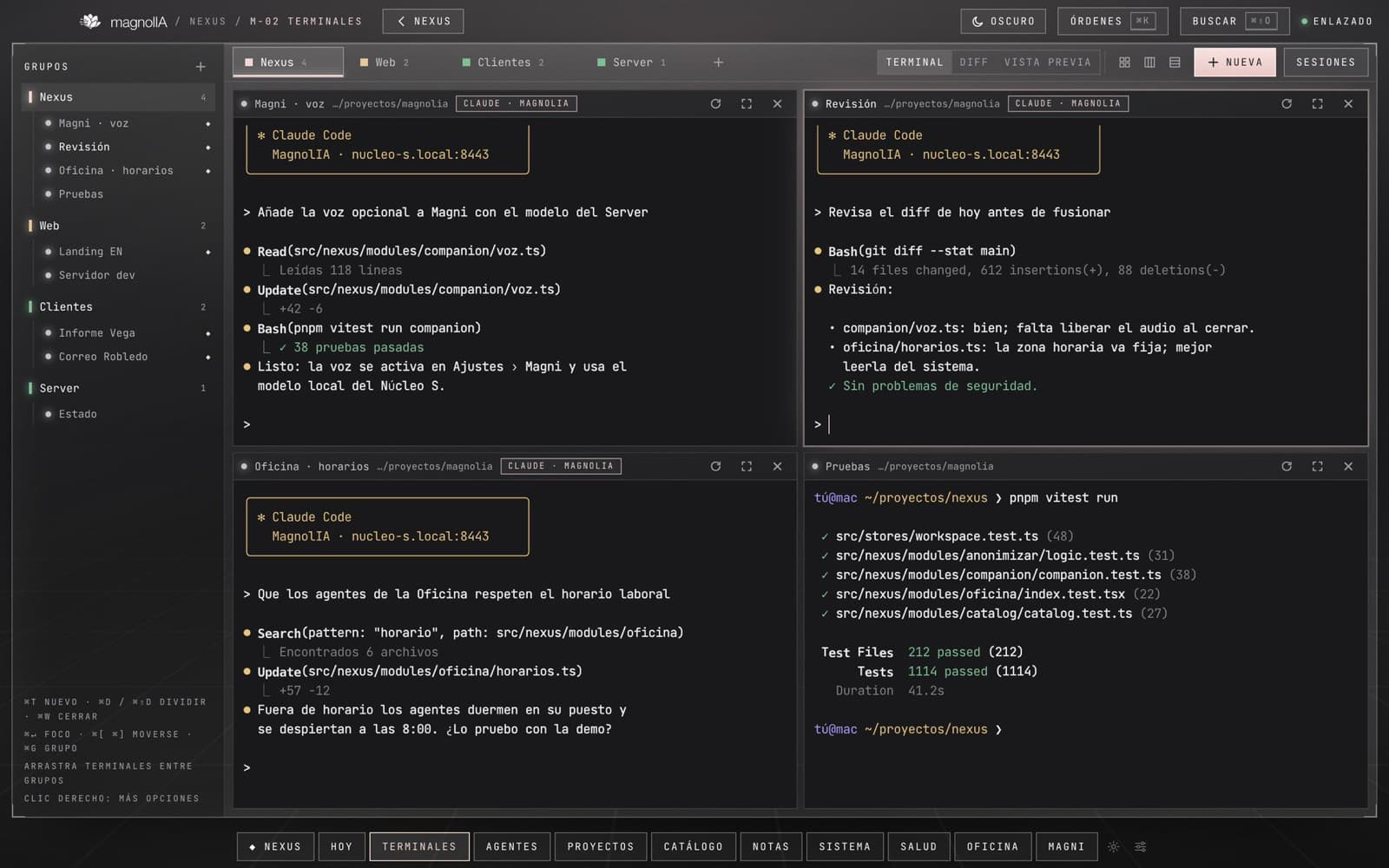
Terminals and sessions
Terminals organised by project, running Claude Code on your MagnolIA Server's models or, where enabled, on Anthropic accounts. Every session is recorded and can be resumed or forked.
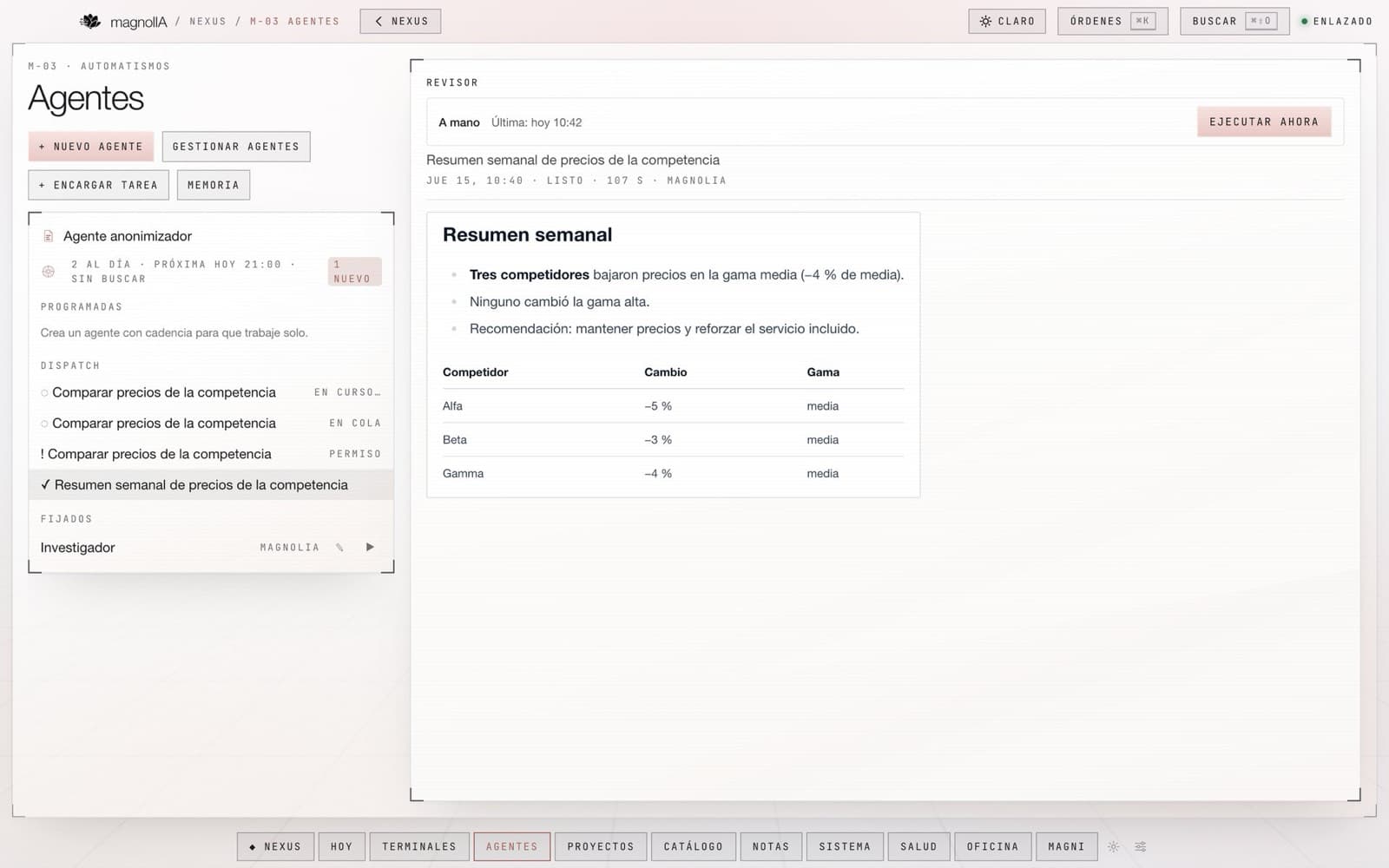
Agents
One-off or recurring tasks, scheduled hourly or daily. Each run keeps a step-by-step history, and actions with side effects —writing, executing, publishing— wait for approval.
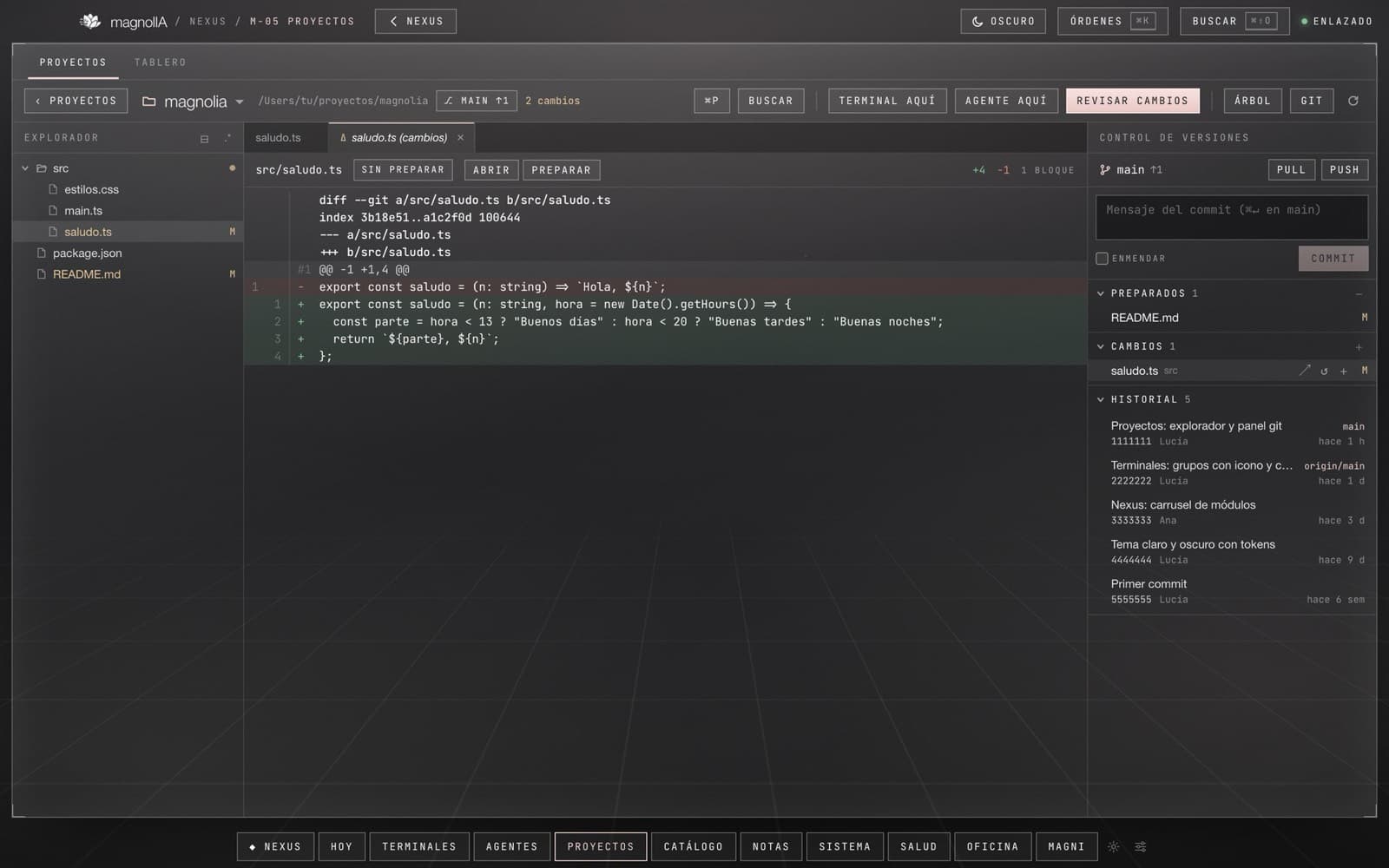
Projects and board
File explorer, editor and full version control. On the board, each card can be assigned to an agent working on an isolated branch; the result is reviewed before it is merged.
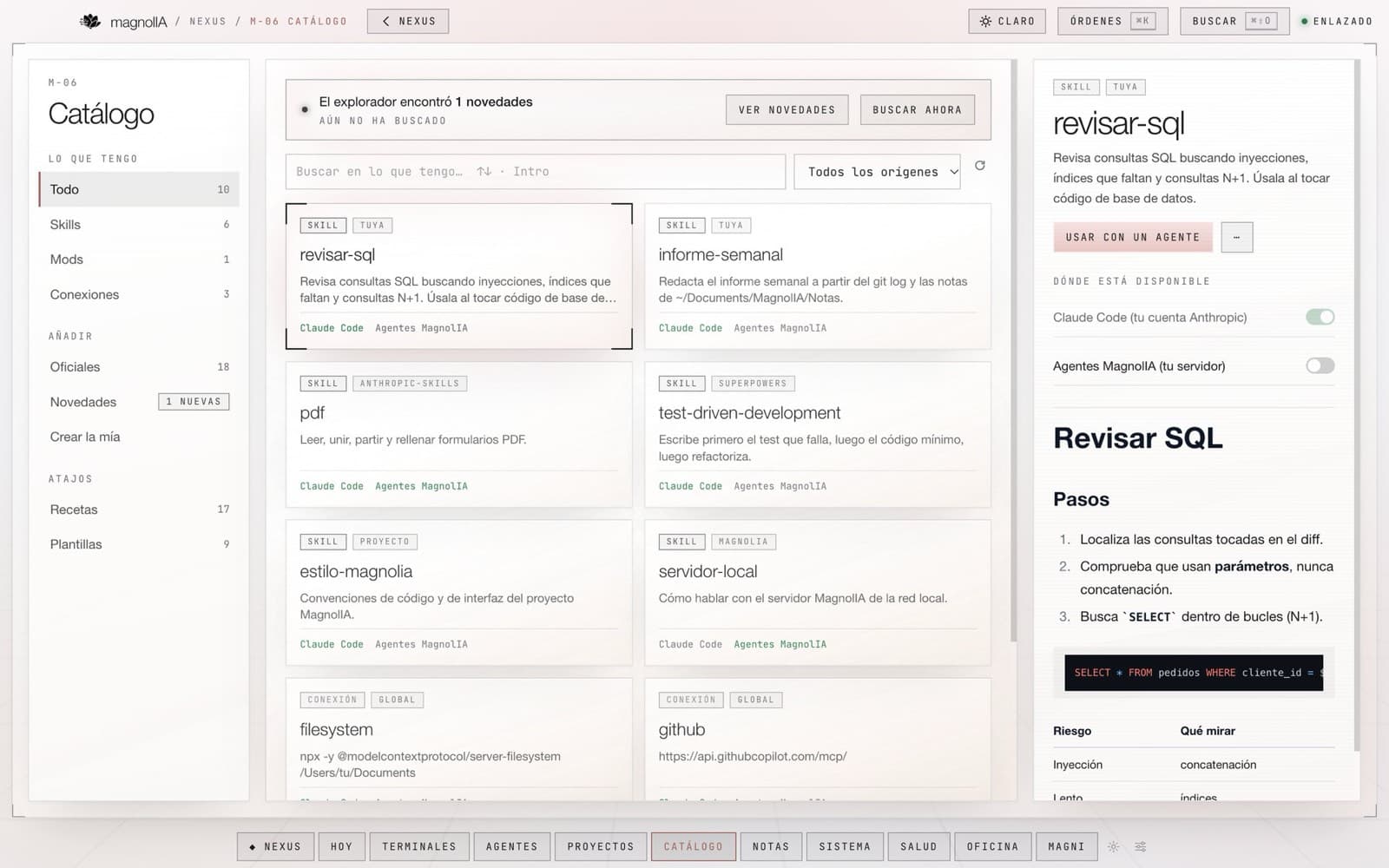
Catalogue
Skills, plugins, MCP connectors, recipes and templates, managed in one place. Each item is enabled separately for Claude Code and for your organisation's agents.
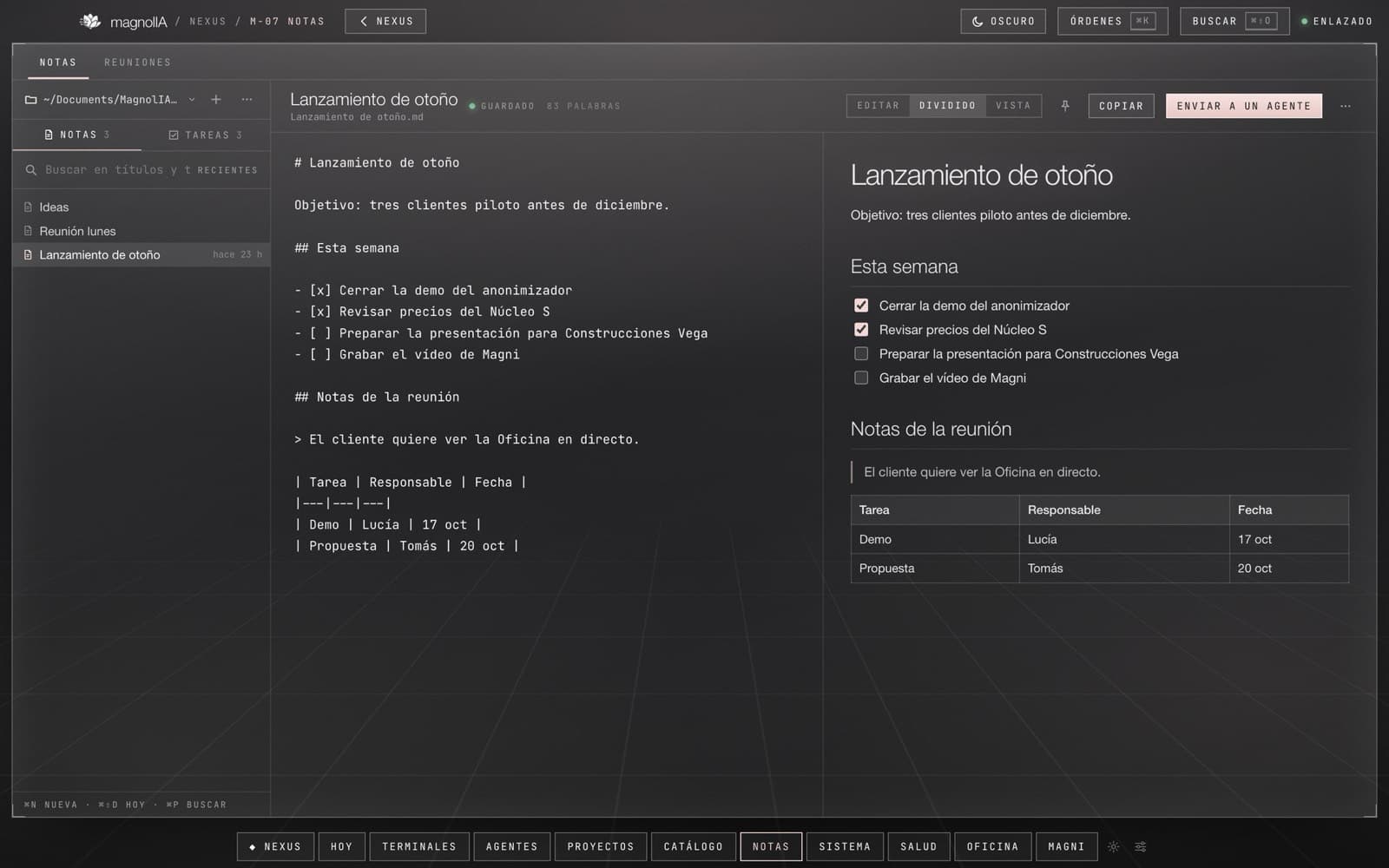
Notes and meetings
Markdown notes in your own folders. Meet, Zoom or Teams calls are transcribed by your MagnolIA Server's speech model and saved as minutes with a summary.
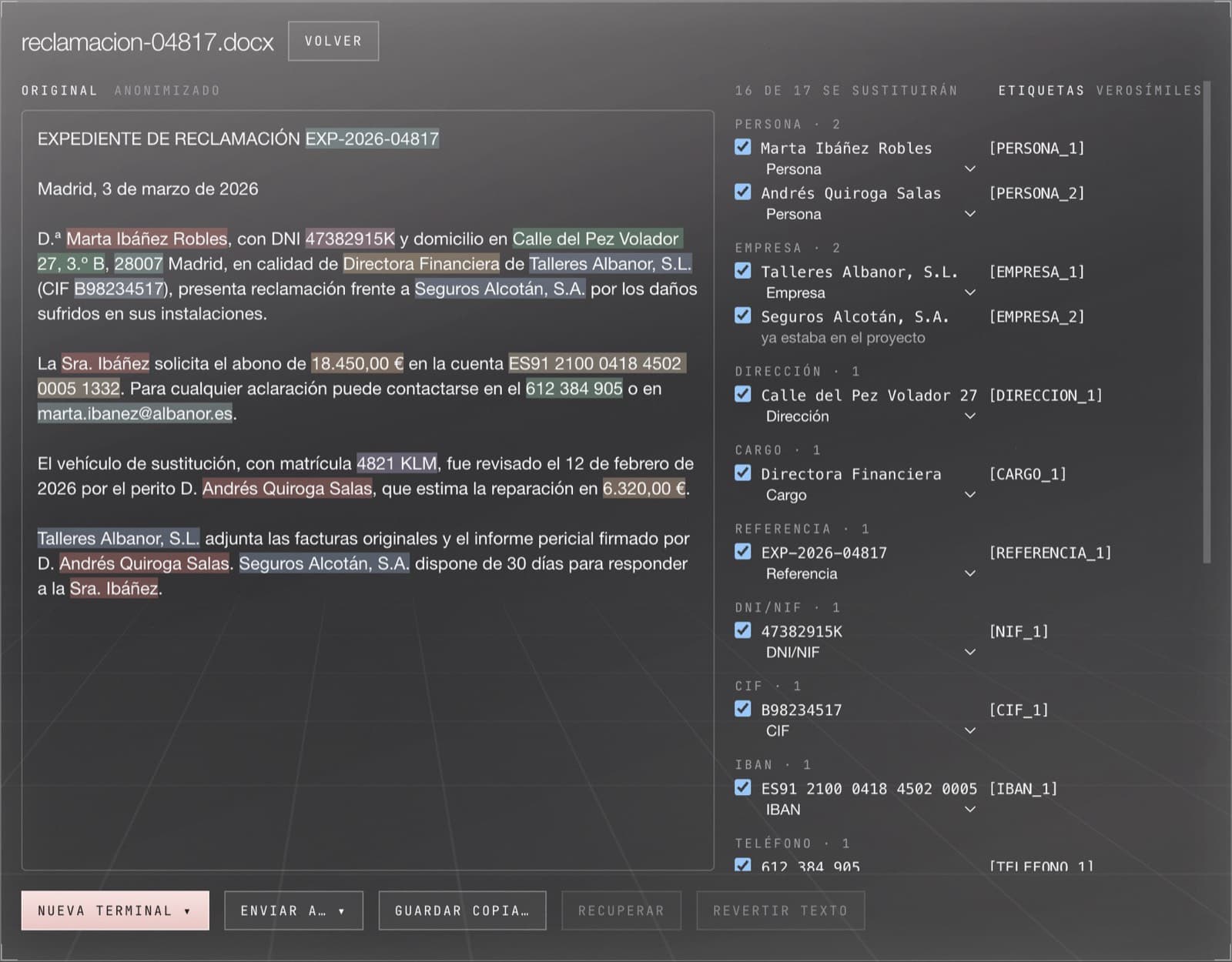
Anonymisation
Replaces identifiers, banking details, names and other sensitive categories in Office documents, PDFs, images and email. The model works on the copy; the result restores the original data.
Office
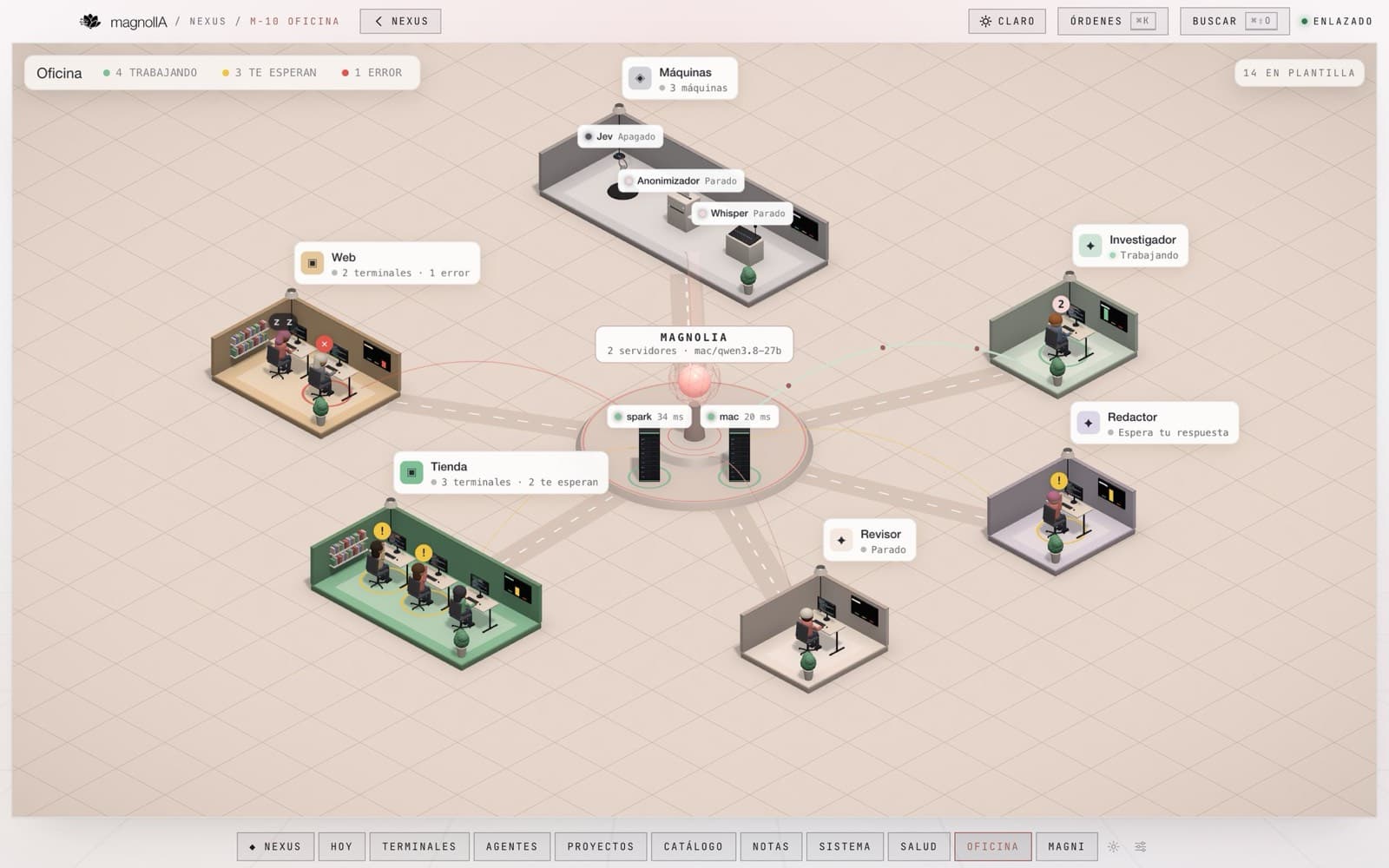
A live view of activity: which agents, terminals and services are working, which are waiting and where something has failed.
Also in Nexus
Agent architectures
Visual flows with conditions, branches and templates, undo and live status for every step. Magni can propose changes and shows the diff before applying them.
Supervised agents
Each agent works only on the files you assign, and Nexus checks the job is finished before marking it done. If an agent gets stuck or repeats itself, it warns you and proposes a rule based on the failure.
Built-in connections
MagnolIA Nexus connects to Google (Gmail, Drive, Docs, Calendar), Microsoft 365 (Outlook, OneDrive, Teams) and Notion. Each AI uses only what the person accepts and asks before changing anything.
Office documents
The models on your MagnolIA Server create and read Excel with formulas and charts, Word, PowerPoint, PDF and databases, with tested instructions loaded only when needed.
Corporate mode
Organisation policy and sign-in with the company account (SSO). On the server, auditing for your SIEM, model routes, document collections and encrypted backups. Everything is off until the organisation turns it on.
Calendar and meetings
A calendar with month, week and day views, plus a mini calendar in Today. In meetings, the transcript identifies who is speaking.
Dictation in terminals
A shortcut in any terminal types what you say into the line without sending it, so you can review it first. On macOS and Windows.
Usage and cost per project
Each project is a card with its usage, cost and activity, and its memory can be browsed by topic.
Every project, a team of agents with memory
Each Nexus project is a world: the agents working on it share a board, a team and a memory. They split the work, reserve what they touch, warn each other about changes and remember decisions from one day to the next.
- Board
- Assignments, file reservations, notices and deliveries, signed and timestamped. Every agent knows what the others are doing before touching anything.
- Project memory
- Decisions, conventions, errors with their cause and open items. Searchable by keyword and by meaning; pinned rules load into every agent at start-up.
- Orchestrator
- An agent that hands out orders, opens terminals and collects results, leaving a trail of who was asked to do what and which skills helped.
- Shared worlds
- Invite other MagnolIA accounts by code as owner, member or reader. Each world's journal travels encrypted with its own key.
Team
- orchestratorassigning
- agent-apiworking
- agent-webworking
- agent-qawaiting
- 09:02
orchestrator Task: move the client portal to the new sign-in. Three fronts: API, web and tests.
- 09:04
agent-api RESERVEsrc/auth and migration 0042.
- 09:05
agent-web RESERVEapp/login. Starting from main.
- 09:31
agent-api → agent-web: the token is now called session_id. It affects your form.
- 09:33
agent-web Got it. Updated, tests green.
- 09:50
agent-qa DONE48 end-to-end tests green. RELEASE tests/e2e.
Memory
- decisionSign-in uses the organisation's MagnolIA account.
- errorA test failed near midnight: it used UTC time.
- ruleNo credentials on the board.
Magni, Nexus's personal assistant
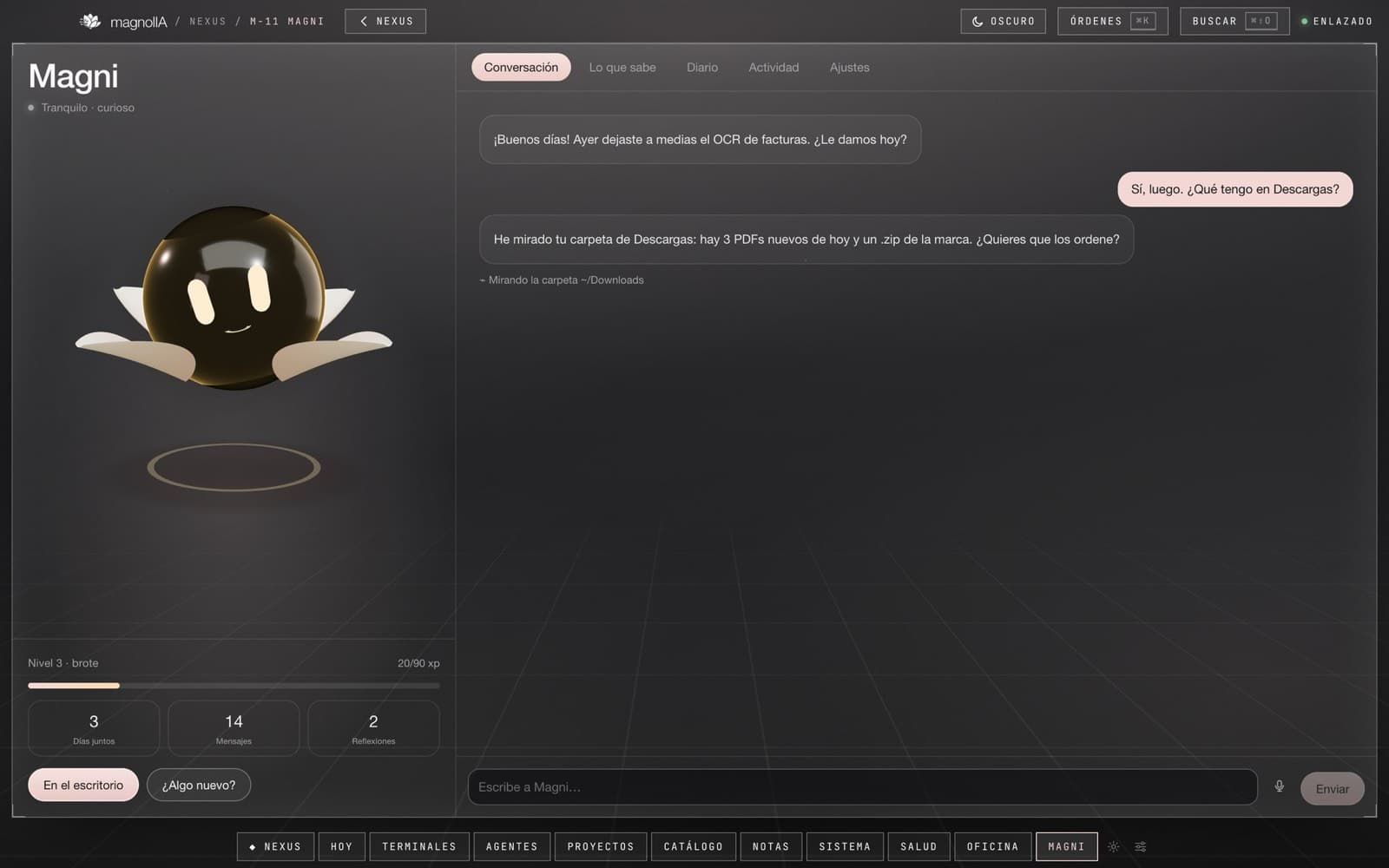
Magni lives inside Nexus and accompanies each person on the desktop, on mobile and over WhatsApp. It knows their context, carries tasks through from start to finish and hands long work to the agents, always within the permissions the person and the organisation grant.
Tasks from start to finish
It has its own browser, visible live: it visits sites, fills in forms, books and buys. It uses saved logins without ever seeing them.
Wallet with limits
Cards with a per-payment and monthly limit, valid only at the named merchant. Every order gets a record with status, amount and deadline.
On mobile and WhatsApp
A mobile app and its own WhatsApp number, with voice notes. If it is busy, messages wait their turn. In room mode it answers to its wake word.
With context
It reads the authorised folders and, if the person allows, their mail, calendar, documents and notes from Google, Microsoft or Notion.
Delegates and follows up
It hands long work to the agents. If something is left waiting, such as a pro forma or a code, it schedules a return and picks it up on its own.
Lasting memory
It recalls by meaning, summarises older context to keep the thread and shares what it knows across the person's devices.
With initiative
It watches the sources the person turns on and acts when needed. Asked in plain language for an assistant with a schedule, it builds it, schedules it and launches it.
By voice on the desktop
In listening mode you address it by name and it answers aloud. It also takes photos and files sent from the phone.
Permissions and privacy
- ›
Approval or free rein. Each person decides whether Magni confirms before buying, paying or sending, or acts within their limits. Either way it notifies and logs it in its activity.
- ›
Credentials outside the model. Passwords and cards are filled in from the encrypted vault without passing through the model.
- ›
Protected areas. System settings and hidden files require permission for both reading and writing.
- ›
Local screen reading. Text recognition happens on the device itself and the capture is not kept.
- ›
Auditable memory. What Magni remembers can be reviewed, corrected and deleted at any time.
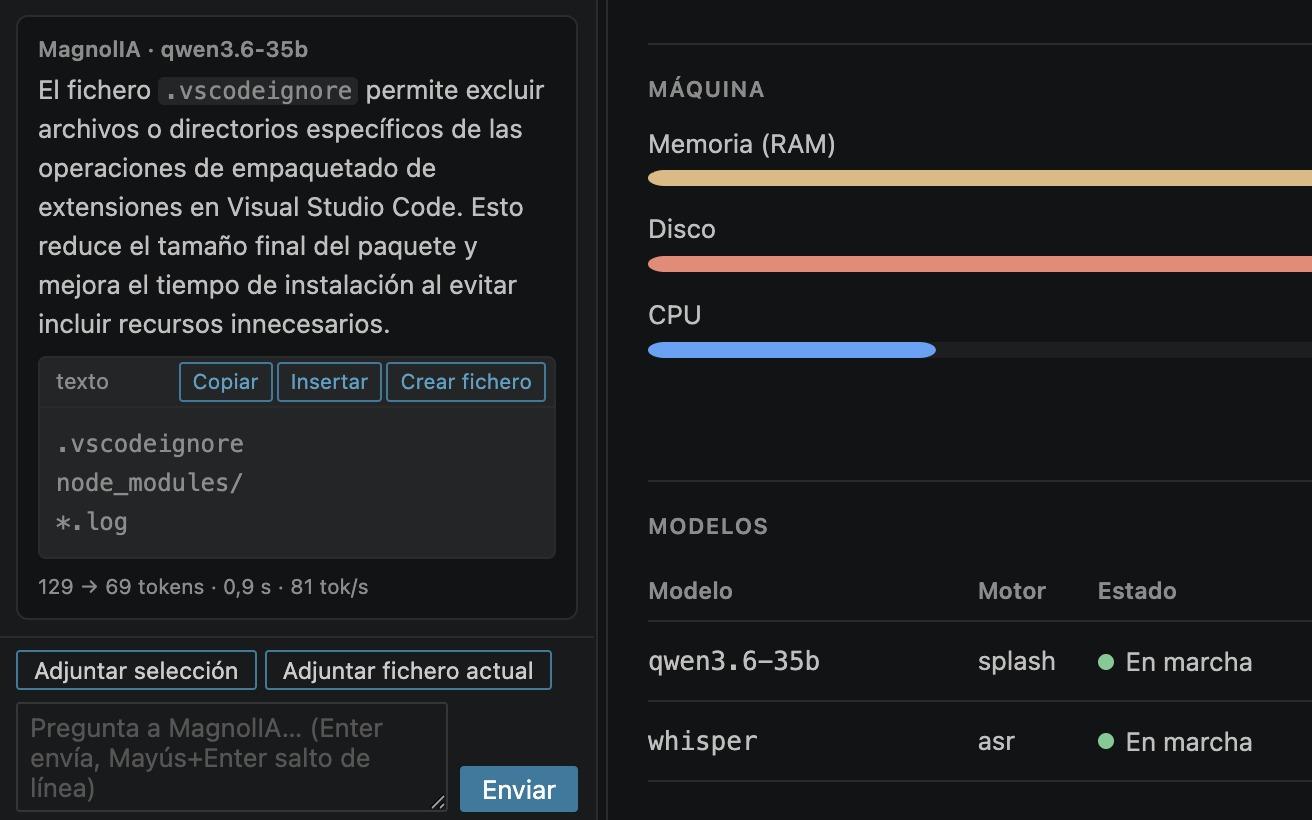
If you work in VS Code, so does MagnolIA.
An extension that brings your MagnolIA Server's models into the editor and opens Claude Code terminals against it, with MagnolIA's skills and MCP servers. It adds a chat about your code, the machine's panel and the Nexus board and memory of whichever project you have open.
- 01Servers and models
- 02Claude Code terminals
- 03MCP and skills
- 04Chat, panel and World
Nexus for macOS and Windows
Nexus connects to your organisation's MagnolIA Server. On launch it finds the server on the network or asks for the corporate address, and each user signs in with their own credentials.
Version 1.5.33 · 16 November 2026 · 93 MB
Requires a MagnolIA Server: a single machine, a DGX Spark or a managed fleet. Without a server, features that rely on third-party models run on the accounts your organisation provides.
On macOS
- 01Open the .dmg and move MagnolIA Nexus to Applications.
- 02On first launch, open the app from the context menu (right-click ▸ Open) and confirm.
- 03Sign in with your MagnolIA user. Meetings will ask for microphone and screen-recording access the first time.
On Windows
- 01Run the installer; required components are installed with it.
- 02If Windows SmartScreen shows a warning, choose “More info” ▸ “Run anyway”.
- 03Sign in with your MagnolIA user.
Magni on mobile
Open magnoliaone.ai/magni on your phone and sign in with your MagnolIA account. Add it to the home screen on iPhone and Android; it is always up to date.
magnoliaone.ai/magniSigned updates
Every release is signed and Nexus verifies the signature before installing it. The app checks for new versions periodically and the user decides when to install.
Frequently asked questions about Nexus and Magni
What is MagnolIA Nexus?
MagnolIA Nexus is MagnolIA's desktop app for macOS and Windows. It brings together AI agents that work as a team with per-project memory, terminals, projects, notes, meetings and the personal assistant Magni, all connected to the organisation's MagnolIA Server. It organises AI work by project and keeps a trace of every run.
What is Magni?
Magni is the personal assistant in MagnolIA Nexus. It accompanies each person on the desktop, on mobile and over WhatsApp, knows their context, carries tasks through from start to finish and hands long jobs to the agents. It always acts within the permissions granted by the person and the organisation.
Can Magni buy or pay without asking permission?
Each person decides: Magni, the assistant in MagnolIA Nexus, either confirms before buying, paying or sending, or acts within set limits, using cards capped per payment and per month and only at the stated merchant. Either way it notifies you and logs it. Passwords and cards are filled in from an encrypted vault without passing through the model.
How do Nexus agents work as a team?
Each MagnolIA Nexus project is a "world": its agents share a board, a team and a memory. They divide the work, reserve the files they touch, notify each other of changes and remember decisions from one day to the next. Nexus checks that each task is actually finished before marking it done.
Can it transcribe meetings without sending audio to the cloud?
Yes. MagnolIA Nexus transcribes Meet, Zoom or Teams meetings using the speech model on your MagnolIA Server, which runs on your infrastructure, and saves them as minutes with a summary. The transcript identifies who is speaking. The audio is not sent to an external service.
Which systems does Nexus run on?
MagnolIA Nexus runs on macOS 13 or later and on Windows. Magni also has a mobile app that can be added to the home screen on iPhone and Android. Nexus requires a MagnolIA Server to connect to; settings, connections and Magni's memory sync between devices with end-to-end encryption.